





Unreal Engine crash reporting

Your Unreal build crashed on someone else's machine. Fix it anyway.

BugSplat plugs into Unreal's crash pipeline, captures the minidump, resolves it against your symbols, and shows you the faulting line. Packaged builds, the editor, and game consoles all report through it.

Why BugSplat for Unreal

BugSplat plugs into Unreal's own crash reporter, so packaged, editor, and game console crashes arrive symbolicated against your PDBs and grouped your way.

01 · It lands

Something breaks in your Unreal build. You find out first.

BugSplat hooks into Unreal's built-in crash reporter, so packaged builds, editor sessions, and game console targets all report through the reporter you already ship. Each report carries the minidump, thread state, log, and build and hardware details, for C++ and Blueprint projects alike. Unreal's own crash metadata comes with it, from the GPU and RHI settings to the device profile. Every field appears on the report's Attributes tab, and you can sort and filter on any of them, add them as columns on the Crashes page, and extend them with your own.

  • Works with Unreal's native crash reporter, no engine surgery required
  • Unreal's crash metadata as attributes you can sort, filter, and show as columns
  • PC, game console, and mobile Unreal targets in one dashboard
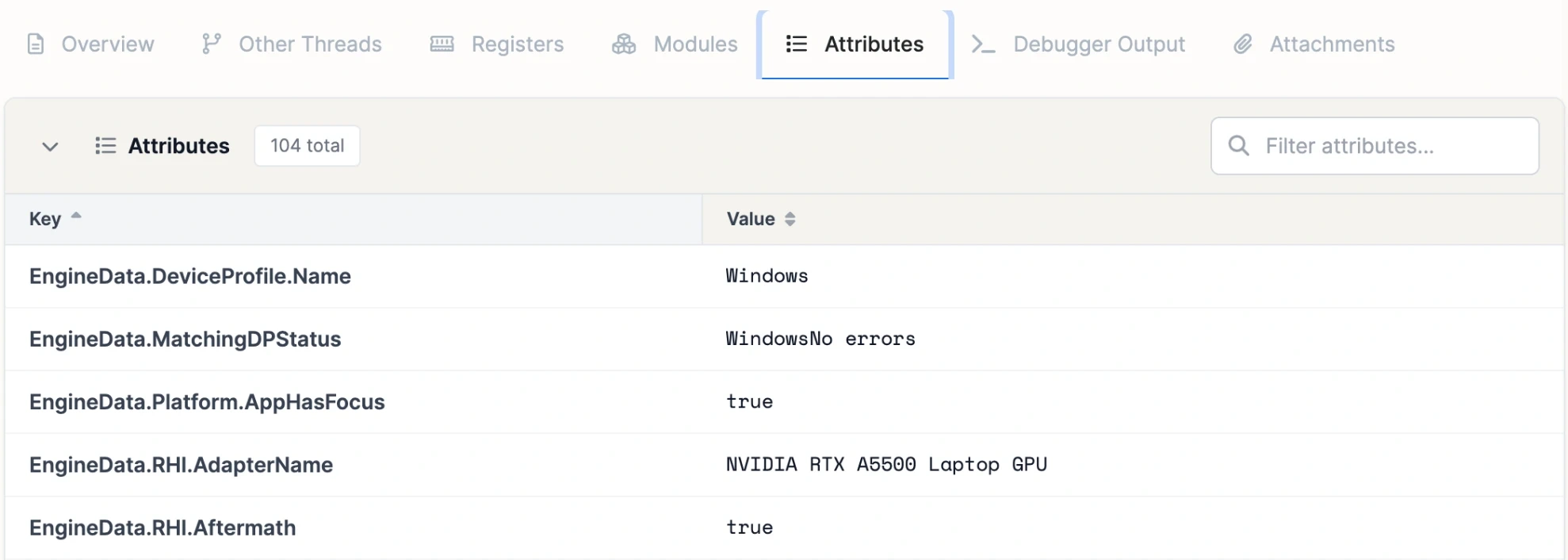
The Attributes tab of an Unreal crash report in BugSplat: 104 attributes from Unreal's crash metadata, including the device profile and GPU adapter name

02 · It groups and resolves

A report count is not a bug count.

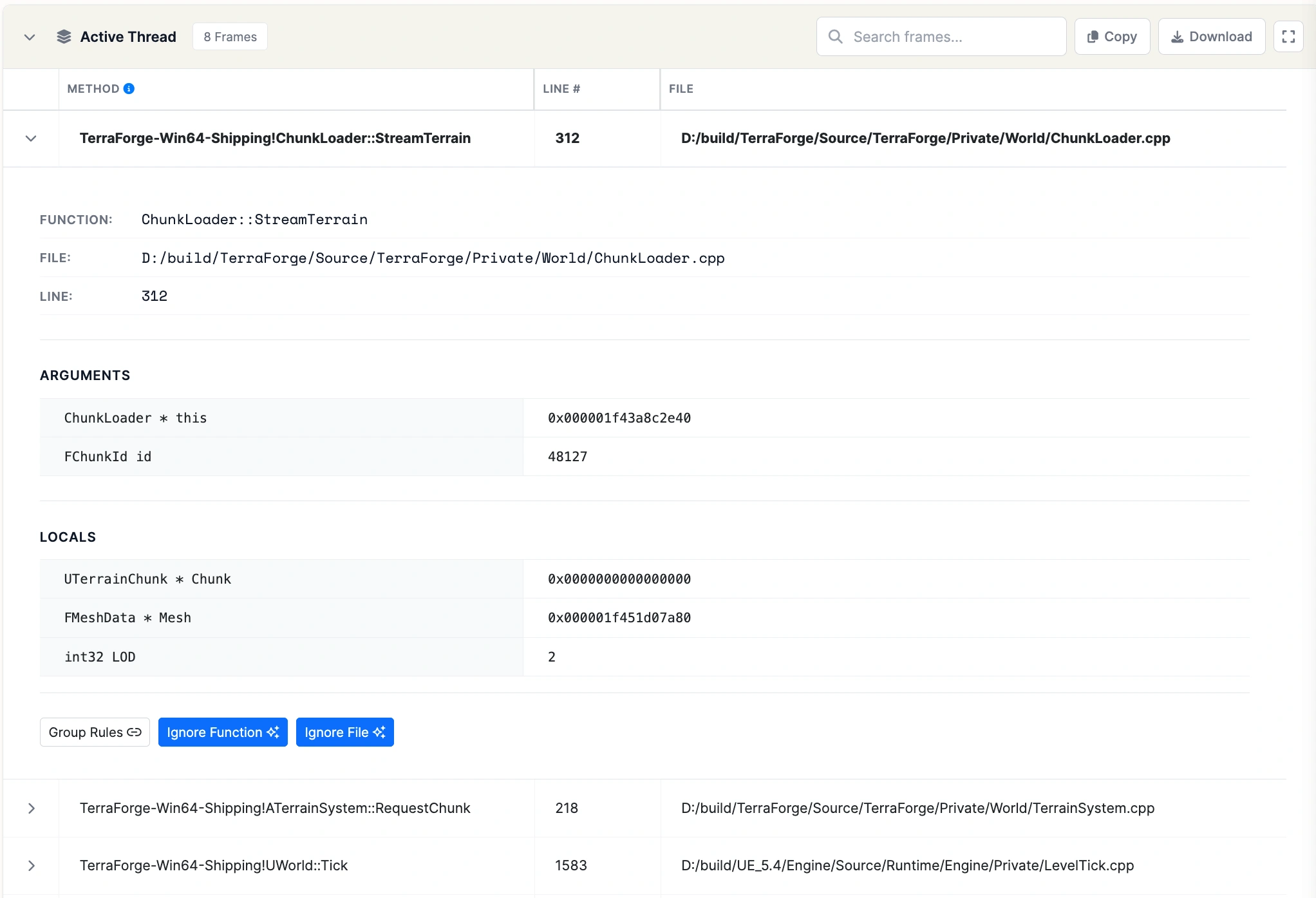
BugSplat groups Unreal crashes your way: your rules decide which call stacks count as the same bug, and the list is ranked by how many people each one hit. Stacks are symbolicated against the PDBs from your packaged build, so you see readable engine and game code frames, not memory addresses.

  • Thousands of reports collapse into a short list of distinct bugs
  • Function names and line numbers, not memory addresses
  • OS, hardware, and build on every report
A symbolicated active thread in BugSplat with the faulting frame expanded to its file, line, arguments, and locals

03 · It tells you

Stay ahead of the next one.

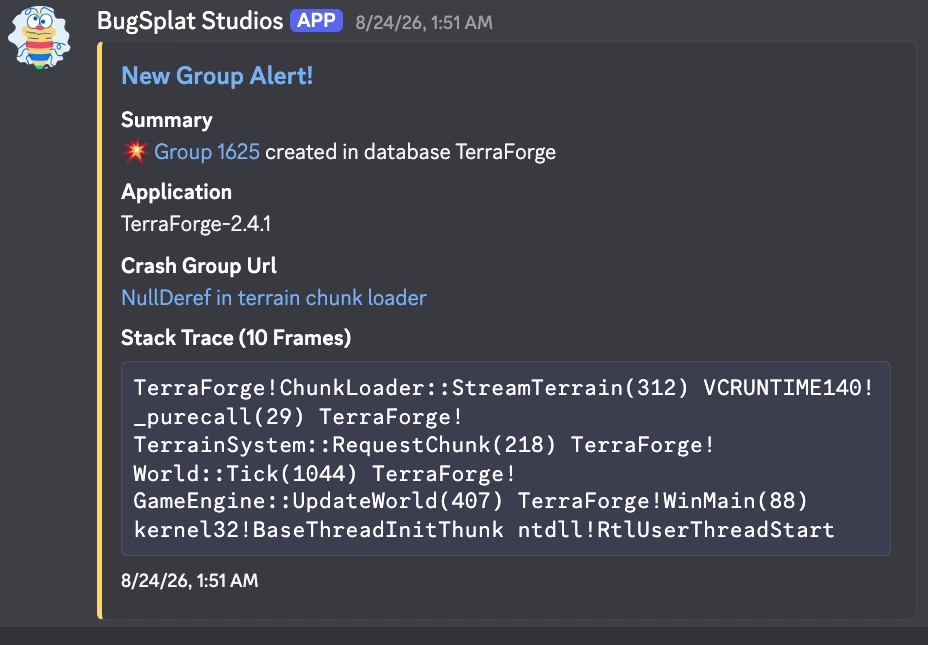
Alerts for Unreal crashes reach Slack, Discord, or Teams the moment something spikes. Version-over-version analytics show whether each release is more stable than the last.

  • Regressions flagged when a fixed crash comes back
  • Daily and weekly digests with the highlights
A BugSplat new group alert in Discord with the crash group and stack trace

What makes BugSplat different

Crash reporting built for native code.

The part of Unreal Engine crash reporting that's hard is the part we've always done.

Native from the start

BugSplat has been turning minidumps into readable stacks since 2005. Symbols, PDBs, and native crashes are the core of the product.

A bill that holds still

Flat monthly plans with fixed limits. A spike in crash volume after a release doesn't change your bill.

Answered by the people who build it

Email support with a Unreal question and you'll hear back from an engineer who builds BugSplat, usually the same day.

Unreal Engine setup

Wire up Unreal and read a real stack the same day.

Add the SDK and upload symbols with each build. If you get stuck, contact support and you'll reach the engineers who build BugSplat.

By clicking "Accept", you agree to the storing of cookies on your device. View our Privacy Policy .